


The 9 Best Japanese Translator Tools: Websites, Apps, and Dictionaries

Full disclosure: This post contains affiliate links. ?
Whether you’re simply building your own language skills or doing professional translation work, picking the best Japanese translator can be tricky. Which ones are the most accurate? Which ones have the specialized vocabulary you need? And how reliable are AI and automatic translators?
I’ve worked in Japanese translation in so many different contexts over the years, both in Japan and the US. Professionally, I’ve dabbled in a variety of works, including translating and interpreting TV shows and movie subtitles, executive-level meetings of all levels at a manufacturing company, political news coverage, and cultural heritage sites for tourism.
I’ll show you nine Japanese translation tools that are still useful now, from quick camera translation to detailed dictionary work. I’ll also explain where each one falls short and when a specialised dictionary or human translator is the better choice.
Editor's note: Before we get started, if you’re looking for an online Japanese course, here’s the course we recommend: Japanese Uncovered – Learn Japanese Through the Power of Story, a course with a fascinating new method by Olly Richards. You can try it for free for 7 days!
The 9 Best Japanese Translator Tools at a Glance
There isn’t one best Japanese translator for every job. Browser tools are easier for long text and formatted documents, while phone apps are better for signs, handwriting, speech and offline lookup. It’s safer to combine a machine translator with a proper dictionary instead of trusting either one on its own.
- Google Translate: Best for signs, speech and everyday travel. Browser, iOS and Android.
- DeepL: Best for polished written text and formatted files. Browser, iOS, Android and desktop.
- ChatGPT: Best when you need to provide context and ask follow-up questions. Browser, iOS and Android.
- WWWJDIC: Best for detailed dictionary, name and kanji searches. Browser; you need to read kana.
- Jisho: Best learner-friendly browser dictionary. Browser.
- imiwa?: Best offline dictionary for recent Apple devices. iPhone and iPad; currently requires iOS 26 or later.
- Yomiwa: Best for camera and handwriting lookup. iOS and Android.
- Weblio: Best Japanese-first English reference. Browser.
- Eijiro: Best for English-Japanese examples aimed at Japanese speakers. Browser, iOS and Android; many examples require Pro.
Table of contents
- The 9 Best Japanese Translator Tools at a Glance
- The Best Japanese Dictionary Database: WWWJDIC and JMdict-Based Tools
- Best for Signs, Speech and Everyday Travel: Google Translate
- Best for Documents: DeepL
- Best When You Can Supply Context: ChatGPT
- Best Japanese-First English Reference: Weblio
- Computer-Assisted Translation (CAT) Tools
- Finding Other Specialized Japanese Translators
- When a Human Translator Still Matters
- Ready to Translate (Hon’yaku suru / 翻訳する)?
The Best Japanese Dictionary Database: WWWJDIC and JMdict-Based Tools
Jim Breen’s dictionary work now lives with the independent Electronic Dictionary Research and Development Group. Its WWWJDIC server draws on the JMdict/EDICT and KANJIDIC projects, and the old Monash mirror is no longer operating.
You’ll also find JMdict data behind learner-friendly tools such as Jisho and imiwa?. Yomiwa is another current option if camera and handwriting lookup matter more to you than a browser interface.
Most Japanese learners I’ve met prefer Jisho’s cleaner interface, but I’m still quite loyal to WWWJDIC. Maybe I’m a bit of a purist! Mind you, WWWJDIC expects you to read at least kana and doesn’t display romanised Japanese, so it isn’t the easiest place to start.
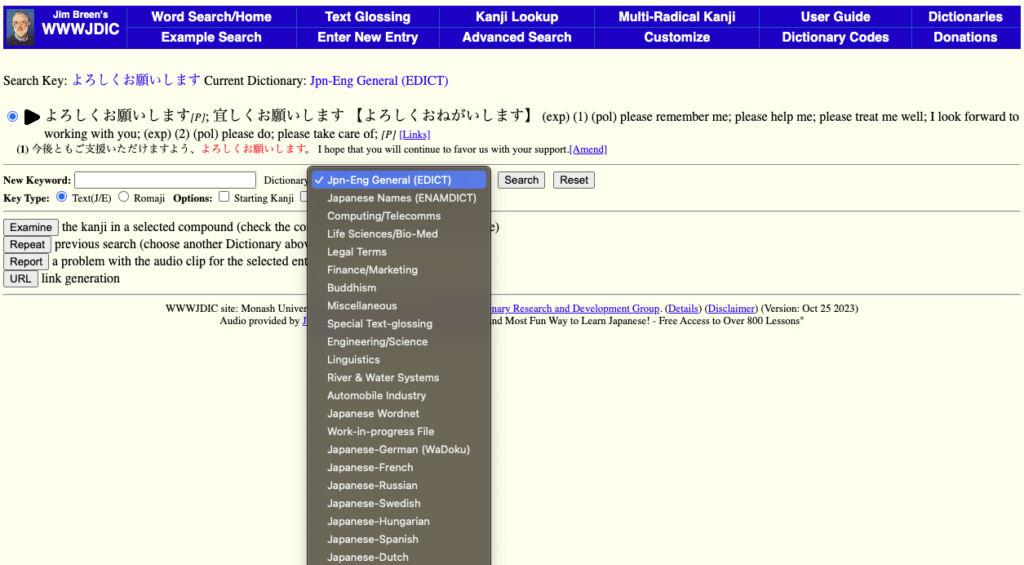
JMdict is updated almost every day and now covers more than 200,000 entries. Entries can show several readings and written forms, along with example sentences, which helps you see how a word behaves in context.
WWWJDIC also includes specialised terminology in fields such as medicine, engineering, law and Buddhism, plus Japanese names and detailed kanji searches.
It isn’t a sentence translator, but it’s invaluable when you need to check a word, name or set phrase instead of accepting a machine’s first guess.
First, it has some translation entries for set phrases or idiomatic expressions. This is a great resource for identifying kotowaza, or Japanese proverbs, which might not seem obvious when put into a translation machine!
Its text-glossing tool can also split a longer passage into words and grammar patterns.
Best for Signs, Speech and Everyday Travel: Google Translate
Google Translate is the easiest all-rounder here. It works in a browser and on iOS and Android, and its mobile app can translate camera text, handwriting, speech and downloaded languages offline.
I remember when Japanese-to-English results often came back as word-for-word gibberish. They’re way more useful now, especially for signs, menus and a quick first pass, but I still double-check anything important.
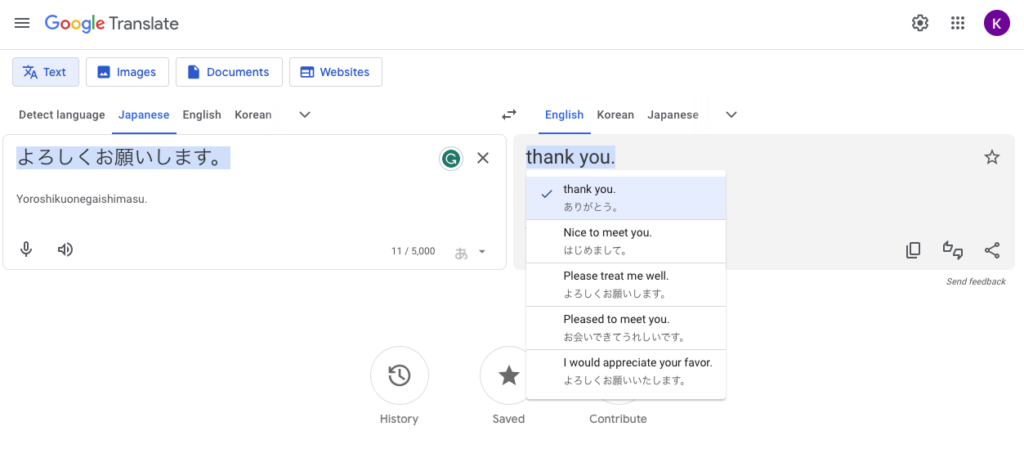
Japanese often leaves subjects unstated, and the right level of politeness depends on who is speaking to whom. A translation can look perfectly grammatical while choosing the wrong person or register.
Best for Documents: DeepL
DeepL is a strong option for written Japanese and formatted files. Its current translator supports Japanese and can handle PDF, Word and PowerPoint documents while preserving their layout, although file limits and advanced features depend on your plan.
Best When You Can Supply Context: ChatGPT
ChatGPT is useful when a translation needs context. You can explain who is speaking, who they’re speaking to and the register you want, then ask it to explain or revise a choice.
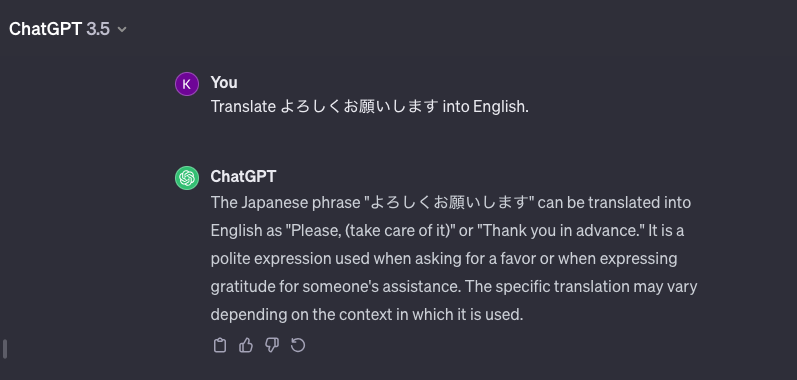
That flexibility doesn’t make the answer reliable by itself. ChatGPT can produce fluent-sounding mistakes, so compare important wording with a dictionary and have high-stakes text checked by a qualified person.
Best Japanese-First English Reference: Weblio
Weblio is a broad Japanese-English reference made mainly for Japanese speakers. It’s especially useful for checking how an English term is explained in Japanese and for finding bilingual example sentences.
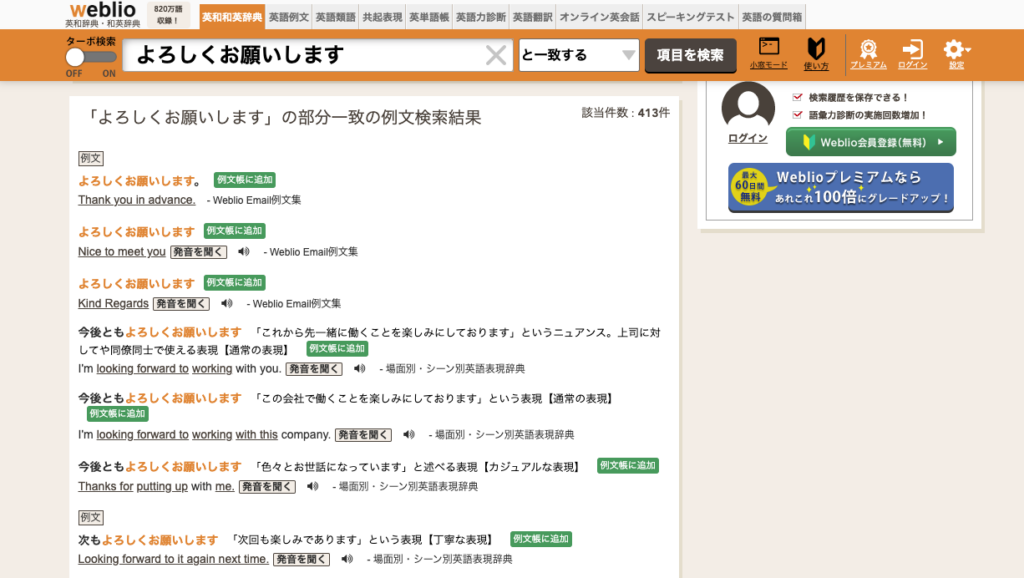
Eijiro (English name: Eijiro; Japanese: 英辞郎) is the closest alternative in this list. I personally find its examples easier to search, but many of them require an Eijiro on the WEB Pro subscription.
Computer-Assisted Translation (CAT) Tools
If you translate professionally, a computer-assisted translation, or CAT, tool can help you keep terminology consistent across a large project. Common features include translation memories, glossaries, terminology management, collaboration and quality checks.
These can be important if you are translating a big project, such as a novel or a television series, and need to translate names and terms consistently throughout. This is especially so if multiple people are working on the same project!
For example, I worked on a translation of a Japanese fantasy anime series with another translator (whom I had no direct interaction with and couldn’t discuss terms). We were translating subtitles for the same show but different episodes at the same time. We had to make note of how we translated names, places, and catchphrases in a shared spreadsheet to make sure we both used the same translation consistently. It was easy to mess up, and quite a headache! Having a CAT tool could have helped with these issues.
These tools change quickly, along with their pricing. DeepL now offers glossaries, translation memories and file translation on some plans, while dedicated CAT platforms have their own strengths. Check the current feature list against your project rather than choosing on the name alone. For a starting point, Benny covers several options in his article on becoming a location-independent freelance translator.
Finding Other Specialized Japanese Translators
When working as a Japanese translator, there are relatively few resources geared for native English speakers. Sometimes you might not find the right specialized dictionary, no matter how hard you search for it in English.
Even a broad dictionary may not surface the right accountancy phrase if you search the ordinary English meaning.
Actually, sometimes you might have the best luck looking for Japan-based translation websites or dictionaries meant to support Japanese translators working with English. Weblio might have the phrases you need in its database, but in case it doesn’t, you can do a targeted internet search.
For example, “to close an account” can mean two different things. An accounting team might close its books (帳簿を締める, chōbo o shimeru), while a bank customer closes an account (口座を解約する, kōza o kaiyaku suru). Adding 経理部 (keiribu, “accounting department”) to your search helps steer the results towards the first meaning.
It might also be worth checking Japanese bookstores, since they often have very useful physical dictionaries of specialized fields. These are often to help Japanese employees learn English phrases for their international work environments.
For example, Toyota has streamlined a lot of its translations of its philosophy and work processes for its global hubs and suppliers. When I worked as a translator at one, I found this book to be very helpful.
So it’s worth looking around at multiple sources to find the right specialized translation assistance tools for you!
When a Human Translator Still Matters
Japanese translation depends on more than dictionary meaning. Subjects are often omitted, and honorific language changes with the social relationship between the people involved, so a tool can miss who did what or choose a socially awkward register.
Machine translation is handy for a first pass, but contracts, subtitles, published copy and sensitive business communication still need qualified human review. Localisation goes further again, adapting the wording to regional expectations, cultural sensitivities and the intended audience.
Ready to Translate (Hon’yaku suru / 翻訳する)?
You’ll probably use a mix of these tools. A machine translator can give you a quick first pass, while a dictionary helps you check the words, readings and context. If you’re learning Japanese, use the answer as a starting point and inspect the sentence rather than copying it blindly.
With a couple of tools and a habit of double-checking the result, you’re ready to get started. Good luck!

Social